On a recent cloud migration, I needed to migrate just one year of one table of data from a client’s servers to another SQL Server hosted in a VM in the cloud. The data structure already existed, I just needed to move the data to it. Our problem was that the VM that we were moving into didn’t actually have enough space to restore the entire database, so a full BACKUP/RESTORE/DELETE wasn’t an option. I used bcp for this since it wouldn’t require me to install anything on the client’s server.
One thing I ran into before anything else: bcp threw a certificate chain error when connecting to the local instance. The fix is the -u flag, which tells bcp to trust the server certificate without validating the chain. This requires bcp version 18 or later, so you can run bcp -v to check. I have it to every command.
The first thing I did was generate a format file. This maps the columns in the export to the columns in the destination table, and it’s worth doing first so you can inspect it before any data moves.
bcp AdventureWorks2022.Person.Person format nul -S localhost -T -n -f person.fmt -uYou won’t get any output in the CMD window from this if the format file was successfully exported. Once it’s exported you can review the output by opening the .fmt file in Notepad, and it should look something like this:
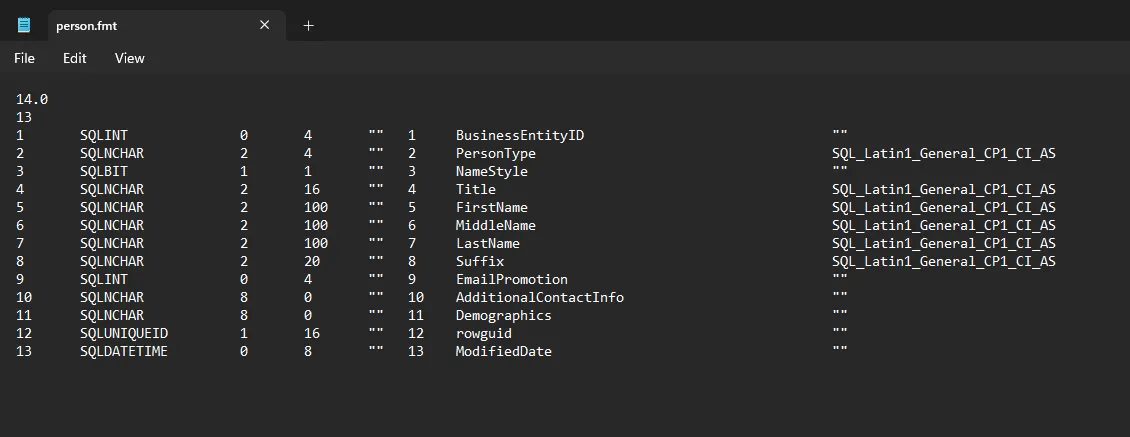
One thing to watch is if you use a three-part name like AdventureWorks2022.Person.Person, don’t also pass -d with the database name. bcp will error telling you that you can’t specify the database name twice.
Before running the full year I tested with one week to make sure the format file was right and the row counts matched.
bcp "SELECT * FROM AdventureWorks2022.Person.Person WHERE ModifiedDate >= '2013-01-01' AND ModifiedDate < '2013-01-08'" queryout person_test.bcp -S localhost -T -f person.fmt -u
Once that checked out, I ran the full year:
bcp "SELECT * FROM AdventureWorks2022.Person.Person WHERE ModifiedDate >= '2013-01-01' AND ModifiedDate < '2014-01-01'" queryout person_2013.bcp -S localhost -T -f person.fmt -u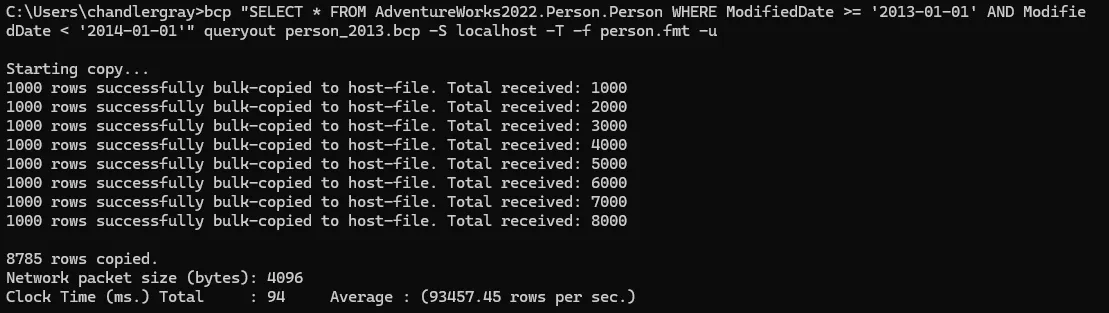
I’m always pleasantly surprised by how fast bcp is. This export of 27,000 rows took about 3 seconds. I’ve had exports of millions of rows take just a few minutes.
I copied the .bcp and .fmt files to the destination machine, then ran the import. The table had an identity column and I needed to keep the original values, so I passed -E. I also set the destination database to simple recovery beforehand to keep log growth manageable.
bcp AdventureWorks2022_dest.Person.Person in person_2013.bcp -S localhost -T -f person.fmt -u -E -b 10000 -e person_errors.txt -q
Some guides recommend -h TABLOCK to reduce lock overhead during bulk inserts. In my case the database wasn’t actively being used during the migration, so it didn’t matter either way.
After the import I ran SELECT COUNT(*) with the same WHERE clause on both servers to confirm the numbers matched, checked the error file was empty, and ran UPDATE STATISTICS on the destination table.
That’s pretty much it! I don’t have to do this very often but it’s nice to have in the toolkit for when I do.
Flags I Used
| Flag | What it does |
|---|---|
-S | Server and instance name |
-T | Windows integrated auth |
-n | Native binary format — only needed when generating the format file; omit it when using -f or bcp will warn that -f overrides it |
-f | Path to the format file |
-E | Preserve identity values from the file instead of generating new ones |
-b | Batch size in rows, so each batch commits independently |
-e | File to write rejected rows and error reasons to |
-h | Table hints passed to the bulk insert operation |
-q | Executes SET QUOTED_IDENTIFIER ON — required when the target table has filtered indexes, indexed views, or computed columns |
-u | Trust the server certificate without validating the chain |
Full flag reference in the bcp documentation.