I often encounter scenarios where query tuning involves more than just speed. It’s also about understanding how SQL Server processes data and which patterns yield the best results. Recently, I explored how different query patterns for filtering dates affect performance, using SET STATISTICS IO ON and SET STATISTICS TIME ON to measure the impact.
Setup
For this analysis, I retrieved user activity from the StackOverflow database’s Users table, specifically for the year 2017 (since my database only contains data through 2018). With millions of rows in the table, this provided a good test case. There is a non-clustered index covering this query, which I’ve included below for reference. The LastAccessDate column is a datetime type.
USE [StackOverflow]
GO

SET ANSI_PADDING ON
GO

CREATE NONCLUSTERED INDEX [IX_LastAccessDate_DisplayName_Reputation] ON [dbo].[Users]
(
	[LastAccessDate] ASC,
	[DisplayName] ASC,
	[Reputation] ASC
)WITH (PAD_INDEX = OFF, STATISTICS_NORECOMPUTE = OFF, SORT_IN_TEMPDB = OFF, DROP_EXISTING = OFF, ONLINE = OFF, ALLOW_ROW_LOCKS = ON, ALLOW_PAGE_LOCKS = ON, FILLFACTOR = 100, OPTIMIZE_FOR_SEQUENTIAL_KEY = OFF) ON [PRIMARY]
GO
Here are the six approaches I tested and their results:
- First, I used
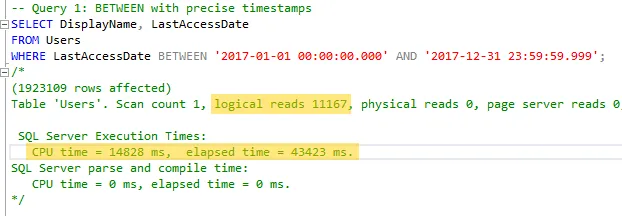
BETWEENwith precise timestamps. This is a common method I see in practice.
- Next, I used
>=and<with precise timestamps. This approach is also fairly common.
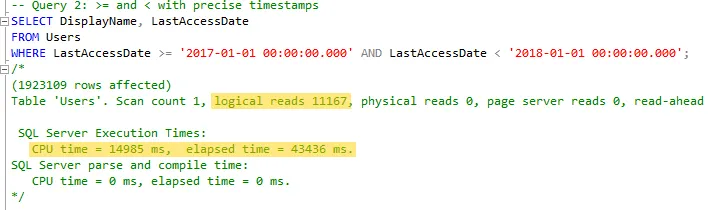
So far, the results were expected. Both queries run quickly enough for my needs and return the expected data. Let’s continue.
- Then I tried
BETWEENagain, but without the precise timestamps. I wanted to see if using a less precise date format would make the query non-sargable.
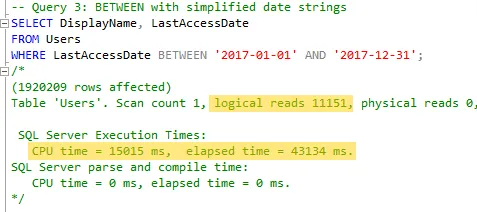
I didn’t see any significant performance degradation in terms of speed or reads, but I did get a few thousand fewer rows than in the previous tests. We’ll discuss that later.
- After that, I applied the same approach using
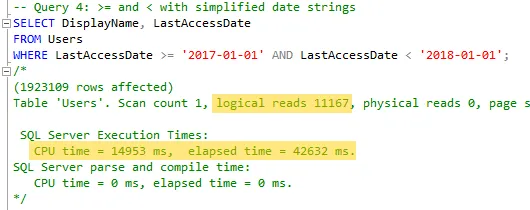
>=and<. The results were similar to the previous tests.
- Next, I used
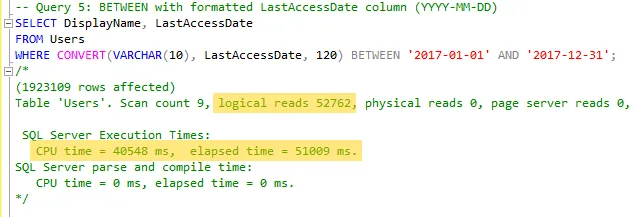
BETWEENagain, but this time converting the datetime value to VARCHAR to manipulate the date format.
- Finally, I tried the same approach with
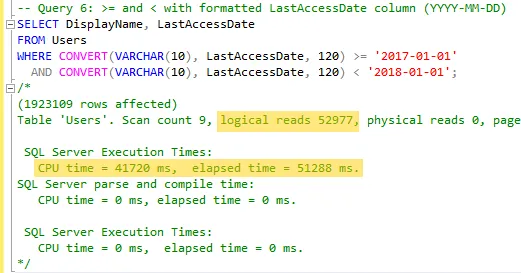
>=and<, converting the datetime value to VARCHAR as I did in step 5.
Key Takeaways
The results show that logical reads increase when using CONVERT or similar formatting functions. This happens because they make queries non-sargable, leading to table scans instead of index seeks. Additionally, simplified date ranges using >= and < perform better than BETWEEN due to better clarity and consistency, especially when dealing with time boundaries. The fewer rows returned in Query 3 highlight the importance of precise filtering logic. Based on these results, I’ll be avoiding CONVERT and BETWEEN on datetime columns going forward.
Since I’m writing this on December 31st, 2024, I want to wish everyone a happy New Year! Thank you for reading!