Query tuning is often more than speed. It’s also about understanding how SQL Server processes data and which patterns give the right results. I tested how six different ways of filtering dates affect performance, using SET STATISTICS IO ON and SET STATISTICS TIME ON.
Setup
I set myself the task of retrieving user activity from the Users table in the StackOverflow database for the year 2017, since the copy I have only has data up through 2018. The table has millions of rows, so I thought it would make a good example. There’s a nonclustered index covering this query, which I’ve scripted below. LastAccessDate is a datetime column.
USE [StackOverflow]
GO

SET ANSI_PADDING ON
GO

CREATE NONCLUSTERED INDEX [IX_LastAccessDate_DisplayName_Reputation] ON [dbo].[Users]
(
	[LastAccessDate] ASC,
	[DisplayName] ASC,
	[Reputation] ASC
)WITH (PAD_INDEX = OFF, STATISTICS_NORECOMPUTE = OFF, SORT_IN_TEMPDB = OFF, DROP_EXISTING = OFF, ONLINE = OFF, ALLOW_ROW_LOCKS = ON, ALLOW_PAGE_LOCKS = ON, FILLFACTOR = 100, OPTIMIZE_FOR_SEQUENTIAL_KEY = OFF) ON [PRIMARY]
GO
Here are the six approaches I tested, along with my results.
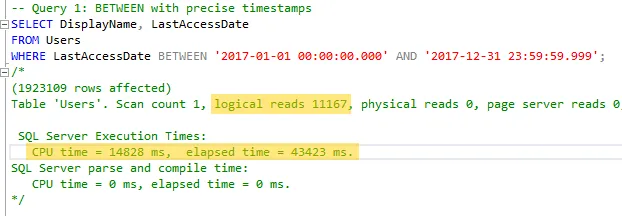
1. BETWEEN with precise timestamps. This is probably the most common method I see in the wild.
2. >= and <, again with precise timestamps. This one is also fairly common.
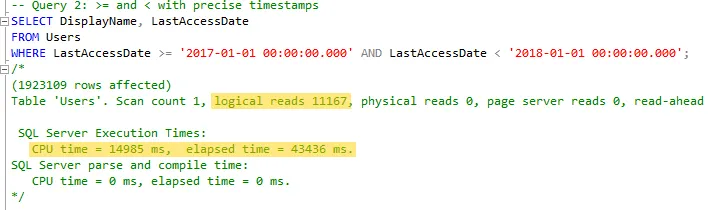
Nothing unusual so far. Both queries returned 1,923,109 rows with 11,167 logical reads, ran fast enough for my needs, and gave me the data I expected. Let’s keep going.
3. BETWEEN again, but with plain dates instead of timestamps. I wanted to see whether the less precise date format would make the query non-sargable, meaning unable to use the index to seek.
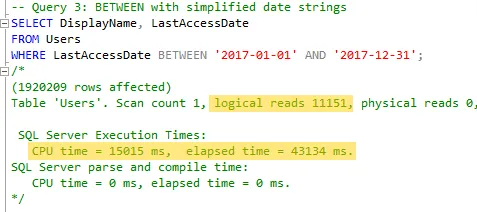
There’s no real change in speed or reads, but if you look closely, it returned 1,920,209 rows, which is 2,900 fewer than the first two queries. More on that below.
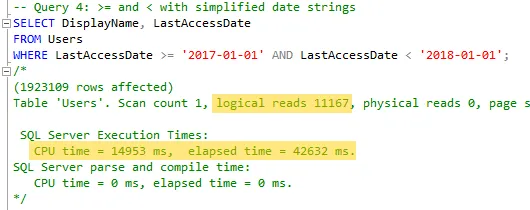
4. The same idea with >= and <. Nothing significant to report. It returned the same 1,923,109 rows with the same 11,167 reads as the first two.
5. BETWEEN again, but converting the datetime column to a VARCHAR to change the date format.
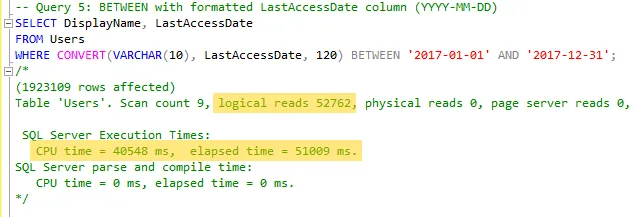
6. The same VARCHAR conversion as step 5, with >= and <.
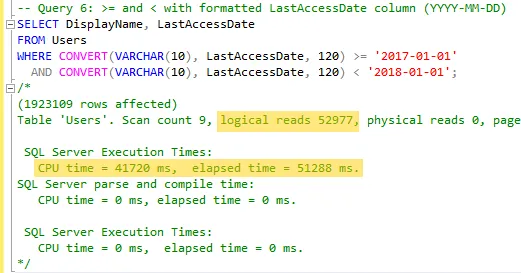
Both CONVERT versions returned the full 1,923,109 rows, but logical reads went from about 11,000 to about 53,000, and CPU time went from about 15 seconds to about 41 seconds. They also show a scan count of 9 instead of 1.
About those missing rows
Query 3 is the one worth going back to. BETWEEN includes both ends of the range, but on a datetime column, '2017-12-31' means midnight at the start of December 31st. Microsoft’s BETWEEN documentation has an example of exactly this. When the time part isn’t specified, “it defaults to 12:00 A.M.,” so any row later than that on the last day falls outside the range. That’s where the 2,900 rows went, and the query gave no sign that anything was missing.
Query 1 has a subtler version of the same problem. datetime values are rounded to increments of .000, .003 or .007 seconds, and Microsoft’s datetime documentation shows '23:59:59.999' being stored as 00:00:00.000 on the following day. So BETWEEN '2017-01-01 00:00:00.000' AND '2017-12-31 23:59:59.999' actually ends at midnight on January 1st, 2018, and would include any row stamped exactly at that moment. It returned the same count as query 2 here, so there weren’t any in this data, but the range isn’t what it looks like.
>= '2017-01-01' AND < '2018-01-01' avoids both problems. It also keeps working on a datetime2 column, which is accurate to 100 nanoseconds, where an end value like 23:59:59.997 would leave out anything in the last few fractions of a second.
Final Thoughts
Logical reads went up almost five-fold with CONVERT. Wrapping the column in a function means SQL Server has to convert every row’s value before it can compare it, so it can’t seek on the index. Microsoft’s index design guide defines a sargable predicate as “a Search ARGumentable predicate that can use an index to speed up the execution of the query,” and the jump in reads here is what losing that looks like.
On the sargable versions, BETWEEN and >=/< performed about the same, so the reason to prefer >= and < is the boundary rather than speed. I’ll be avoiding CONVERT on my datetime columns, and BETWEEN on anything with a time component.