Switching doors in the Monty Hall problem wins two games out of three, and staying wins one. I know that’s the answer and it still doesn’t feel right to me. It’s also what I think of when I’m looking at an execution plan that SQL Server compiled for somebody else’s parameter.
The game
You’re on a game show with three doors. There’s a car behind one of them and a goat behind each of the other two. You pick a door, and the host, Monty, opens one of the two you didn’t pick to show you a goat. Then he asks whether you want to keep your door or switch to the other closed one.
With two doors left it looks like a coin flip. What makes it different is that Monty knows where the car is and never opens that door. Wikipedia’s article on the problem lists the rules the usual answer depends on, including that the host “must always open a door to reveal a goat and never the car.” Your first pick was right one time in three, and nothing Monty does afterwards changes that, so the other two thirds are sitting behind the door he left closed.
If you’d rather see it than follow the reasoning, this plays the game 200,000 times:
import random

N = 200_000
stay = switch = 0
for _ in range(N):
    car = random.randrange(3)
    pick = random.randrange(3)
    opened = random.choice([d for d in range(3) if d != pick and d != car])
    other = [d for d in range(3) if d != pick and d != opened][0]
    stay += pick == car
    switch += other == car

print(f"stay {stay / N:.4f}  switch {switch / N:.4f}")
It prints numbers close to 0.33 for staying and 0.67 for switching. MythBusters tested it too, in a 2011 episode called “Wheel of Mythfortune.”

Where SQL Server comes in
The first time a stored procedure runs, SQL Server compiles a plan for it using the parameter values from that call, then caches the plan and reuses it for later calls. Microsoft’s page on recompiling a stored procedure puts it this way: “any parameter values that are used by the procedure when it compiles are included as part of generating the query plan.” This is what people mean by parameter sniffing. If the first value is a typical one, the plan suits most of the calls that follow. If it isn’t, every call after it runs on a plan built for a value it doesn’t have.
That’s where the game comes to mind for me. A choice gets made with the information available at the time, and the question is whether to revisit it once you know more. By default SQL Server doesn’t revisit it. The cached plan stays until something causes a recompile. The comparison is loose, since there’s no host and none of the probability carries over, but “should I switch now that I know more” is the question I end up asking about a cached plan.
The demo
The setup builds a table where one value makes up almost every row. Run it on a test instance, because the steps after it clear the plan cache.
-- Setup
CREATE DATABASE MontyDB
GO

DROP TABLE IF EXISTS dbo.MontyTest;

CREATE TABLE dbo.MontyTest (
	Id INT IDENTITY PRIMARY KEY
	,Category VARCHAR(20)
	,SomeData CHAR(100)
	);

-- Insert skewed data: 1 very common value, 2 rare values
INSERT INTO dbo.MontyTest (
	Category
	,SomeData
	)
SELECT CASE
		WHEN n <= 1000
			THEN 'RareA'
		WHEN n <= 2000
			THEN 'RareB'
		ELSE 'Common'
		END
	,REPLICATE('x', 100)
FROM (
	SELECT TOP (100000) ROW_NUMBER() OVER (ORDER BY (SELECT NULL)) AS n
	FROM sys.all_objects a
	CROSS JOIN sys.all_objects b
	) AS x;
-- (100000 rows affected)

-- Create index to make plan choices interesting
CREATE NONCLUSTERED INDEX IX_Monty_Category ON dbo.MontyTest (Category);
That’s 1,000 rows of ‘RareA’, 1,000 of ‘RareB’ and 98,000 of ‘Common’, so ‘Common’ is 98% of the table.
DBCC FREEPROCCACHE with no arguments clears every plan on the instance, not only the ones in this database. The documentation says it “causes all plans to be evicted,” which “can cause a sudden, temporary decrease in query performance as the number of new compilations increases.” On SQL Server 2016 and later, ALTER DATABASE SCOPED CONFIGURATION CLEAR PROCEDURE_CACHE clears the plans for the current database only.
Step 1: Create a stored procedure to trigger plan reuse
-- Clean cache and create procedure
DBCC FREEPROCCACHE;
GO

DROP PROCEDURE IF EXISTS dbo.SniffMonty;
GO
CREATE PROCEDURE dbo.SniffMonty @Category VARCHAR(20)
AS
BEGIN
    SET NOCOUNT ON;
    SELECT * FROM dbo.MontyTest WHERE Category = @Category;
END;
GO
Step 2: Run it with the rare value first
-- This execution generates the cached plan
EXEC dbo.SniffMonty @Category = 'RareA';
That call compiles a plan for ‘RareA’ and caches it. Running the procedure again with ‘Common’ reuses that plan.
-- Run with common value, reusing the plan compiled for RareA
EXEC dbo.SniffMonty @Category = 'Common';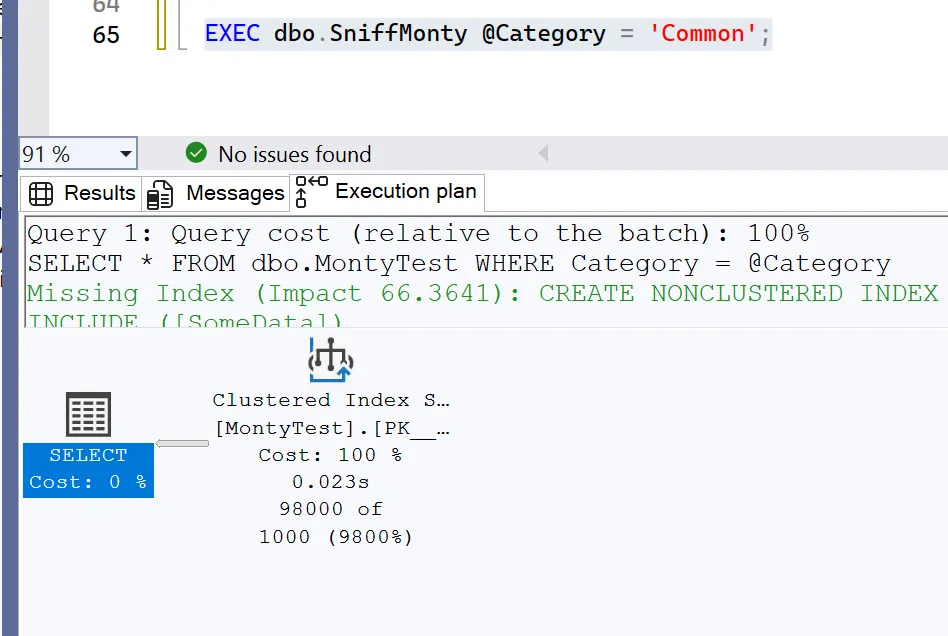
The numbers under the operator, 98000 of 1000 (9800%), are the actual row count over the estimate. Hovering over the operator shows the same thing in more detail, with 1000 for “Estimated Number of Rows Per Execution” and 98000 for “Actual Number of Rows for All Executions.”
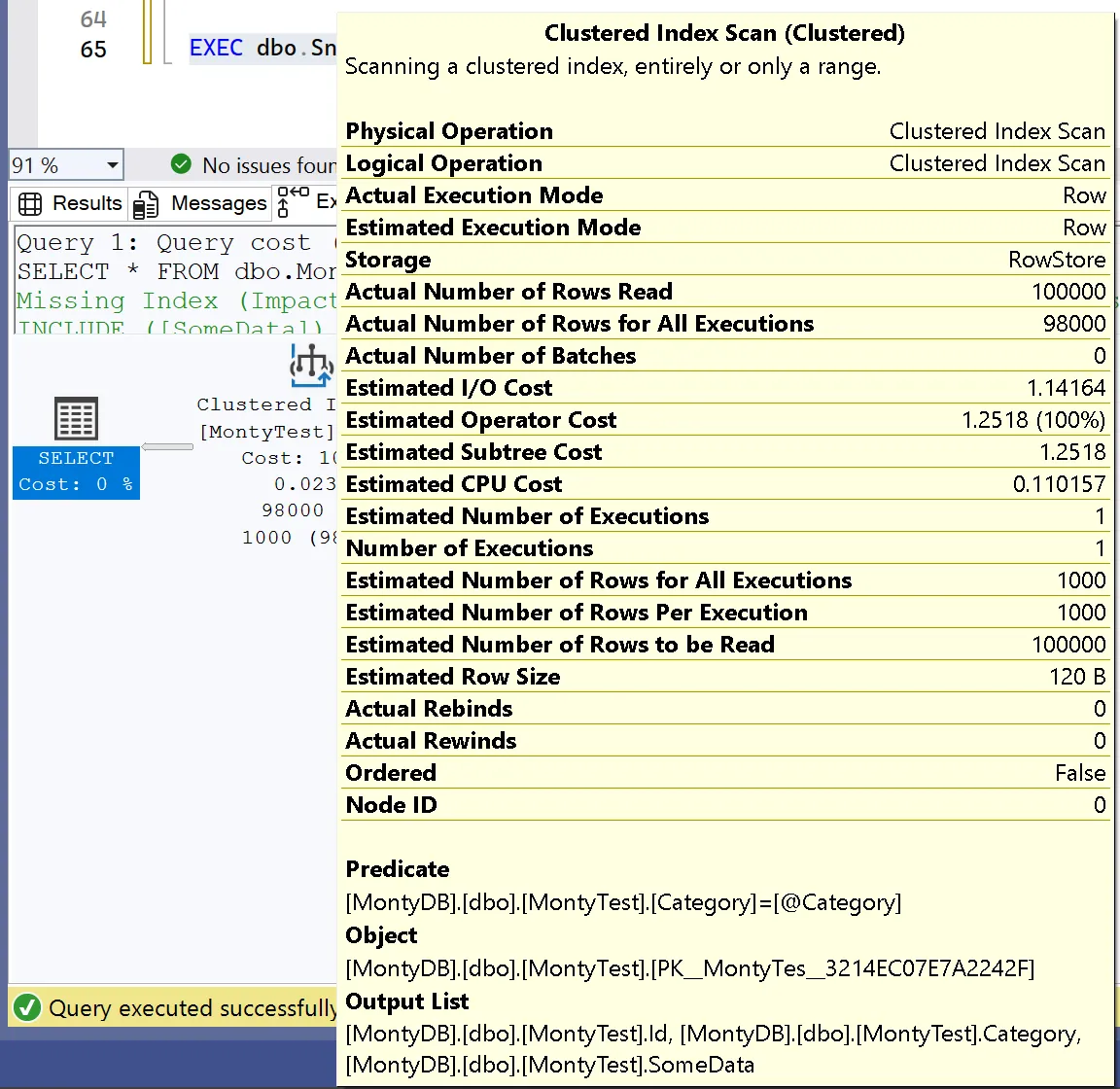
The estimate of 1,000 came from ‘RareA’, which is the value the plan was compiled for. The call that reused it returned 98 times as many rows as the plan expected.
Step 3: Clear the cache and reverse the order
-- Clear cache
DBCC FREEPROCCACHE;
GO

-- Now run with the common value first
EXEC dbo.SniffMonty @Category = 'Common';
-- Then rare
EXEC dbo.SniffMonty @Category = 'RareA';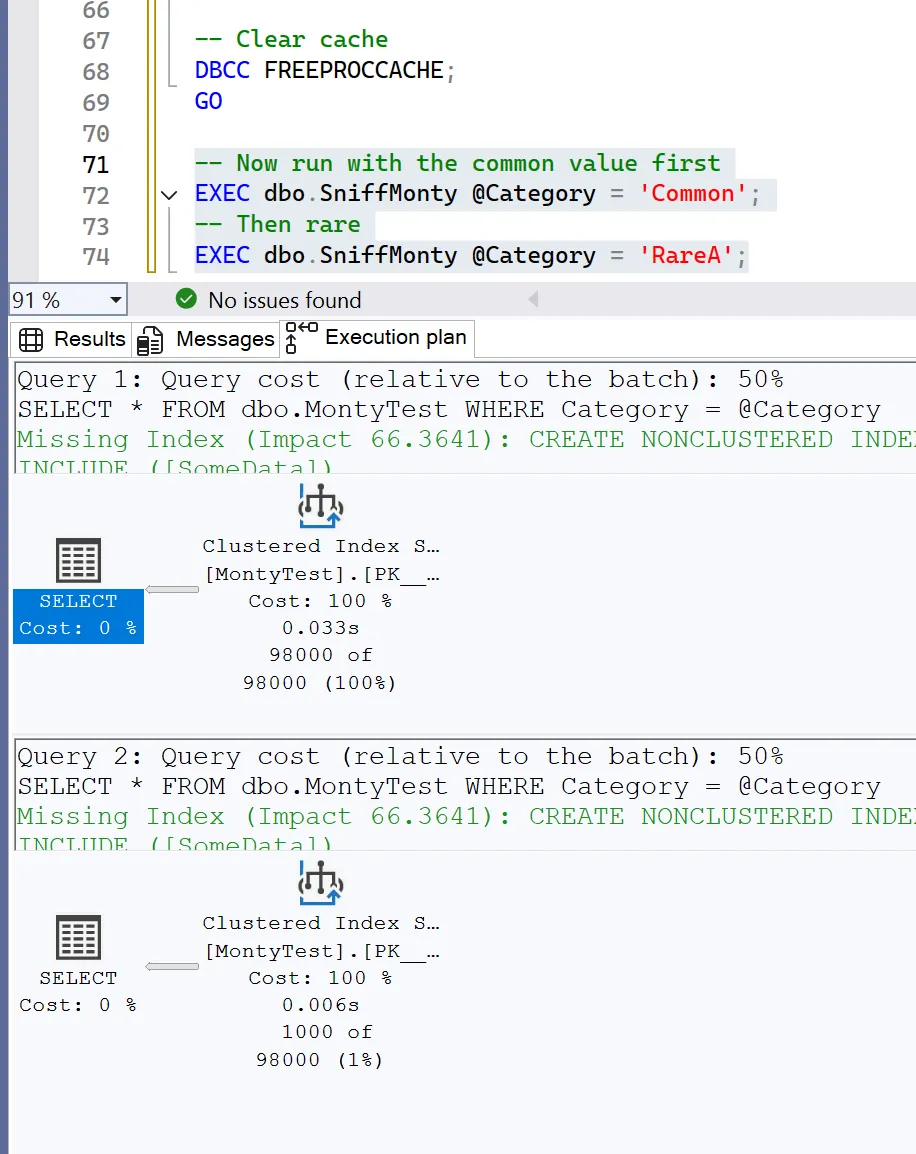
Both calls ran in one batch, so the screenshot has both plans. ‘Common’ went first and got 98000 of 98000 (100%), which is what it looks like when a plan runs with the value it was compiled for. ‘RareA’ reused that plan and got 1000 of 98000 (1%). The estimate is now 98 times too high where it was 98 times too low before.
What the plans actually show
The setup creates an index on Category so the optimizer has a choice to make, but it didn’t use that index in any of these runs. Every plan above is the same Clustered Index Scan, which reads the whole table, and the tooltip shows it reading all 100,000 rows. The estimate changed between runs and the plan stayed the same.
The likely reason is in the green text at the top of each plan. SQL Server suggests a missing index that includes SomeData. The procedure selects every column, and IX_Monty_Category only has Category, so using it would mean a trip back to the table for the rest of each row. That’s the key lookup I wrote about in avoiding key lookups. For this table, SQL Server estimated that scanning was cheaper even when it expected only 1,000 rows. Confirming it would mean rerunning the demo with fewer columns selected, or with the suggested index in place, and checking whether the two orders then produce different plans.
So the demo shows the estimate going stale, which is the core of parameter sniffing, but it doesn’t show a stale plan costing anything. The elapsed times are all small: 0.023s for ‘Common’ on the plan compiled for ‘RareA’, 0.033s for ‘Common’ on its own plan, and 0.006s for ‘RareA’ on the plan compiled for ‘Common’. The trouble starts when the estimate decides between two different plans. Microsoft describes that case as one where “a single cached plan for a parameterized query isn’t optimal for all possible incoming parameter values.”
Ways to switch doors
Recompile. EXEC ... WITH RECOMPILE compiles a plan for the values in that call. The statement-level version, OPTION (RECOMPILE) inside the procedure, tells SQL Server to “generate a new, temporary plan for the query and immediately discard that plan after the query completes execution,” according to the query hints documentation. Every call pays for a compile that way, which is worth measuring before using it on a procedure that runs constantly. In this demo, recompiling would give each call an accurate estimate, but going by the screenshots it would still be a scan.
-- Force recompile per-execution
EXEC dbo.SniffMonty @Category = 'Common' WITH RECOMPILE;
EXEC dbo.SniffMonty @Category = 'RareA' WITH RECOMPILE;
OPTIMIZE FOR UNKNOWN. The same page says this hint makes the optimizer “use the average selectivity of the predicate across all column values, instead of using the runtime parameter value.” With three distinct values in this table, I’d expect that to come out around a third of the rows, which is wrong for all three of them, though the demo doesn’t show the estimate it actually produces.
OPTIMIZE FOR (@Category = 'Common'). This compiles the plan as if every call passed ‘Common’. That suits a table like this one, where almost every call probably will, and it puts ‘RareA’ where it was in Step 3.
Parameter Sensitive Plan optimization. On SQL Server 2022 and later, PSP optimization “automatically enables multiple, active cached plans for a single parameterized statement,” chosen by the parameter value at runtime. It needs database compatibility level 160, it “currently only works with equality predicates,” which Category = @Category is, and it doesn’t run on queries with a RECOMPILE hint. The screenshots don’t show MontyDB’s compatibility level, so it isn’t clear whether PSP was available when they were taken.
What this doesn’t answer yet
Two things are still open. The first is a version of this demo where the index really is the better choice for ‘RareA’, so the stale estimate leads to a different plan instead of the same one. The second is running it at compatibility level 160 to see whether PSP splits the procedure into separate plans for ‘RareA’ and ‘Common’.