I wanted to see what changed in my environment when I used SELECT * instead of listing only the columns my application needed, so I ran the same single-customer lookup three ways against a CustomerProfile table with 500,000 rows. The three forms were a narrow application payload (CustomerID, Email, LastLogin, Status), an explicit full payload, and SELECT *.
From plan details, all three versions used the same lookup method in this run. The main difference was the size of the payload returned to the application:
| Query shape | Estimated row size |
|---|---|
| Narrow projection | 342 bytes |
| Explicit full projection | 2965 bytes |
SELECT * | 2965 bytes |
In this run, SELECT * returned a payload about 8.7x wider than the narrow query.
Plan property captures from the run:
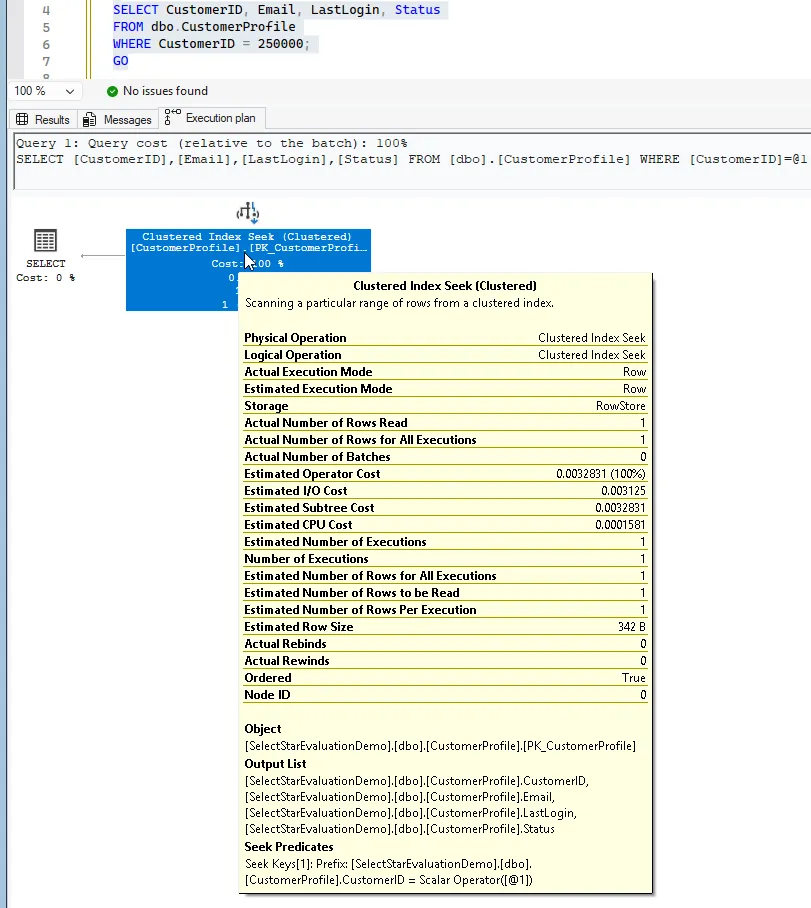
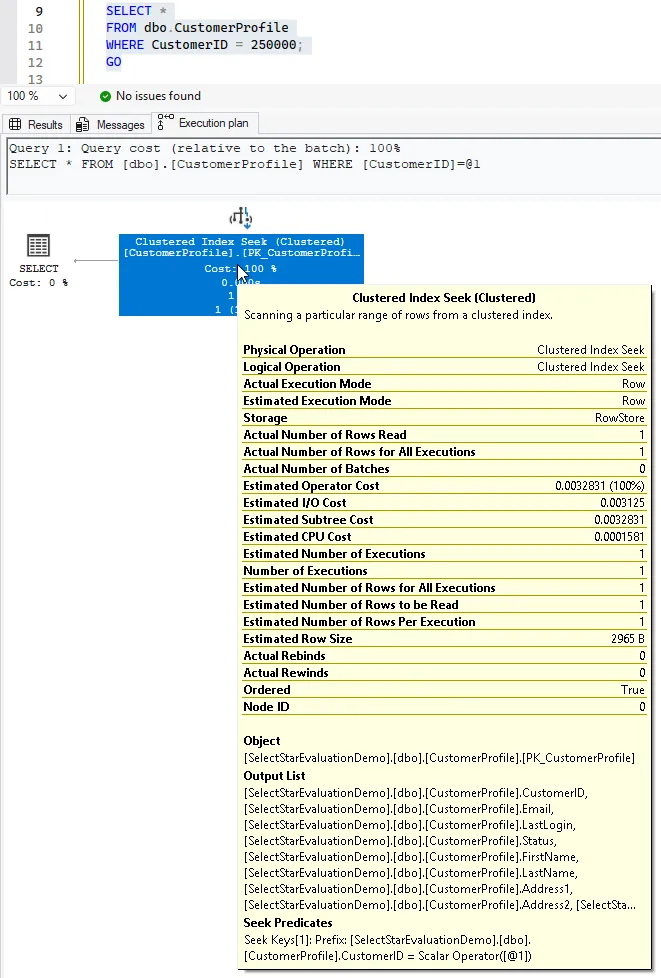
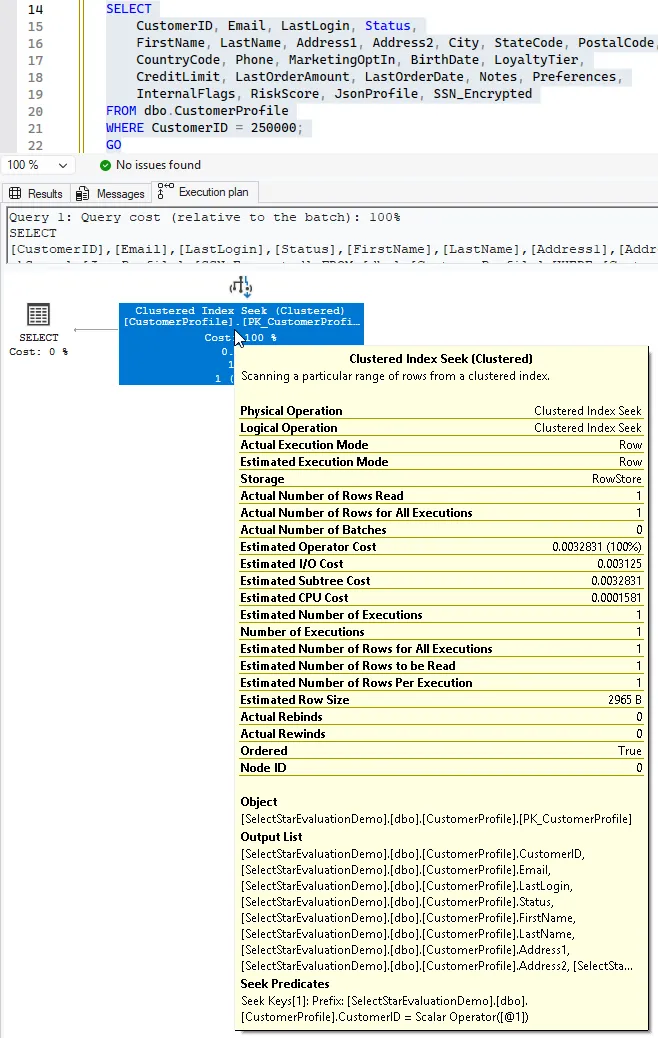
The performance details from this run are below. Query cost was read from the plan banner and CPU/elapsed came from STATISTICS TIME output.
| Query | Relative query cost (single-query batch) | Estimated CPU cost (plan) | Observed CPU time | Observed elapsed time |
|---|---|---|---|---|
| Narrow projection | 100% | 0.0001581 | 0 ms | 0-1 ms |
| Explicit full projection | 100% | 0.0001581 | 0 ms | 37 ms |
SELECT * | 100% | 0.0001581 | 0 ms | 39-40 ms |
Two notes help with interpretation. First, query cost here is relative to the current batch, so it is useful for side-by-side shape checks but not useful as a scale metric by itself. Second, CPU is reported as 0 ms for all three queries in this run, which means CPU was below the visible resolution of this capture. Because of that, the scale math below uses payload size and elapsed time.
Using the row-size delta from this run, 2965 - 342 = 2623 extra bytes were returned per call when SELECT * was used instead of the narrow query.
| Executions/day | Extra payload/day | Extra payload/month (30d) |
|---|---|---|
| 100 | 262,300 bytes (~0.25 MB) | ~7.50 MB |
| 1,000 | 2,623,000 bytes (~2.50 MB) | ~75.06 MB |
| 100,000 | 262,300,000 bytes (~250.15 MB) | ~7.33 GB |
| 1,000,000 | 2,623,000,000 bytes (~2.44 GB) | ~73.29 GB |
Using the same run’s elapsed-time values also gives a straightforward throughput view:
| Executions/day | Narrow projection (1 ms) | Explicit full projection (37 ms) | SELECT * (39-40 ms) |
|---|---|---|---|
| 100 | 0.1 sec | 3.7 sec | 3.9-4.0 sec |
| 1,000 | 1 sec | 37 sec | 39-40 sec |
| 100,000 | 1m 40s | 61m 40s | 65m 0s-66m 40s |
| 1,000,000 | 16m 40s | 10h 16m 40s | 10h 50m 0s-11h 6m 40s |
For CPU, this capture reported 0 ms per call for all three queries. That means CPU was below SQL Server’s visible 1 ms resolution in this test. The table below shows the practical implication: measured CPU remains 0 at this capture granularity, and the only safe extrapolation is an upper bound of < 1 ms per call.
| Executions/day | Measured CPU/day (from this run) | Upper bound if each call were < 1 ms |
|---|---|---|
| 100 | 0 ms | < 0.1 sec |
| 1,000 | 0 ms | < 1 sec |
| 100,000 | 0 ms | < 100 sec |
| 1,000,000 | 0 ms | < 1,000 sec (~16m 40s) |
This does not mean every SELECT * query is a problem. It shows that in this scenario, wider payload has a measurable cost profile, especially as daily execution counts increase. If an application really needs the full row, SELECT * can still be reasonable. If it only needs a few columns, returning everything adds overhead without adding value.
If you want to check this on your own instance, run the setup and comparison queries below and inspect Estimated Row Size plus the STATISTICS TIME output.
Setup (500k-row demo table)
USE master;
GO

IF DB_ID('SelectStarEvaluationDemo') IS NULL
    CREATE DATABASE SelectStarEvaluationDemo;
GO

USE SelectStarEvaluationDemo;
GO

DROP TABLE IF EXISTS dbo.CustomerProfile;
GO

CREATE TABLE dbo.CustomerProfile
(
    CustomerID int IDENTITY(1,1) NOT NULL,
    Email nvarchar(320) NOT NULL,
    LastLogin datetime2(0) NOT NULL,
    Status char(1) NOT NULL,
    FirstName nvarchar(80) NULL,
    LastName nvarchar(80) NULL,
    Address1 nvarchar(120) NULL,
    Address2 nvarchar(120) NULL,
    City nvarchar(80) NULL,
    StateCode char(2) NULL,
    PostalCode nvarchar(20) NULL,
    CountryCode char(2) NULL,
    Phone nvarchar(30) NULL,
    MarketingOptIn bit NULL,
    BirthDate date NULL,
    LoyaltyTier tinyint NULL,
    CreditLimit money NULL,
    LastOrderAmount money NULL,
    LastOrderDate datetime2(0) NULL,
    Notes nvarchar(400) NULL,
    Preferences nvarchar(500) NULL,
    InternalFlags int NULL,
    RiskScore decimal(9,4) NULL,
    JsonProfile nvarchar(1000) NULL,
    SSN_Encrypted varbinary(256) NULL,
    CONSTRAINT PK_CustomerProfile PRIMARY KEY CLUSTERED (CustomerID)
);
GO

;WITH n AS
(
    SELECT TOP (500000)
        ROW_NUMBER() OVER (ORDER BY (SELECT NULL)) AS i
    FROM sys.all_objects a
    CROSS JOIN sys.all_objects b
)
INSERT dbo.CustomerProfile
(
    Email, LastLogin, Status,
    FirstName, LastName, Address1, Address2, City, StateCode, PostalCode,
    CountryCode, Phone, MarketingOptIn, BirthDate, LoyaltyTier,
    CreditLimit, LastOrderAmount, LastOrderDate, Notes, Preferences,
    InternalFlags, RiskScore, JsonProfile, SSN_Encrypted
)
SELECT
    CONCAT('user', i, '@example.com'),
    DATEADD(MINUTE, -1 * (i % 100000), SYSUTCDATETIME()),
    CASE WHEN i % 7 = 0 THEN 'I' ELSE 'A' END,
    CONCAT('First', i),
    CONCAT('Last', i),
    CONCAT(i, ' Main St'),
    NULL,
    CONCAT('City', i % 1000),
    RIGHT('00' + CONVERT(varchar(2), (i % 50) + 1), 2),
    RIGHT('00000' + CONVERT(varchar(5), i % 100000), 5),
    'US',
    CONCAT('555-01', RIGHT('00' + CONVERT(varchar(2), i % 100), 2)),
    CASE WHEN i % 3 = 0 THEN 1 ELSE 0 END,
    DATEADD(DAY, -1 * (i % 20000), CAST('2025-01-01' AS date)),
    i % 5,
    (i % 20000) * 1.0,
    (i % 5000) * 1.0,
    DATEADD(DAY, -1 * (i % 365), SYSUTCDATETIME()),
    REPLICATE('n', 100),
    REPLICATE('p', 120),
    i % 1024,
    CAST((i % 10000) / 100.0 AS decimal(9,4)),
    CONCAT('{"segment":"', i % 12, '","score":', i % 100, '}'),
    CONVERT(varbinary(256), HASHBYTES('SHA2_256', CONVERT(varchar(20), i)))
FROM n;
GO
Queries to Compare
SET STATISTICS IO, TIME ON;
GO

SELECT CustomerID, Email, LastLogin, Status
FROM dbo.CustomerProfile
WHERE CustomerID = 250000;
GO

SELECT *
FROM dbo.CustomerProfile
WHERE CustomerID = 250000;
GO
l
SELECT
    CustomerID, Email, LastLogin, Status,
    FirstName, LastName, Address1, Address2, City, StateCode, PostalCode,
    CountryCode, Phone, MarketingOptIn, BirthDate, LoyaltyTier,
    CreditLimit, LastOrderAmount, LastOrderDate, Notes, Preferences,
    InternalFlags, RiskScore, JsonProfile, SSN_Encrypted
FROM dbo.CustomerProfile
WHERE CustomerID = 250000;
GO
For my use case, the practical takeaway is simple: match the query payload to what the application actually needs.